

Your AI assistant, trained to run your marketing
LetsTok Skills is a free, open-source library of 10 ready-made marketing workflows for Claude, Cursor, Codex and other AI agents. Install once, then just ask - your assistant creates video ads, plans your week of content, launches Meta campaigns and posts everywhere with LetsTok.
Works with Claude (Claude.ai, Cowork, Claude Code), Cursor, Codex and any agent that loads Markdown skills.
Just ask - the right skill takes over
No prompt engineering. Say what you want in plain language and the matching skill runs the whole flow: one round of questions, generate, preview, publish.
 Scan website · generate ad Approved
10 marketing workflows, ready to use
Each skill is a complete guided flow built on the LetsTok connector - click any card to see it on GitHub.
letstok-fast-video-ad
A 9:16 video ad in one streamlined pass: one round of questions, generate, preview, publish.
letstok-connect-and-post
Connect Instagram, TikTok, Facebook, X, YouTube, LinkedIn & more - then post or schedule content.
letstok-weekly-content-plan
A marketing strategy for your business plus a full week of content, generated and scheduled.
letstok-viral-hooks-ads
5 trendy video ads built on currently-trending hooks and viral techniques, ready to A/B test.
letstok-meta-ads-campaign
Meta (Facebook/Instagram) ads strategy, generated creative and a live campaign launch.
letstok-real-estate-marketing
A complete real-estate package: strategy, content, organic posting and a Meta lead-gen campaign.
letstok-long-tutorial-video
Long-form tutorial or explainer video: scene planning, keyframes, titles, subtitles, YouTube publish.
letstok-ai-search-visibility
A GEO strategy to get your website recommended by ChatGPT, Claude, Gemini and AI search.
letstok-social-analytics-review
A performance review across your channels with concrete next-content recommendations.
letstok-brand-kit
Build your brand profile once so every video, post and campaign stays on-brand.
The skills chain into a full marketing engine
Use them alone, or in this order for the best results.
Set your brand
brand-kit teaches every other skill your voice, colors and audience.
Connect channels
connect-and-post links Instagram, TikTok, Facebook and more.
Create content
fast-video-ad, weekly-content-plan and viral-hooks-ads generate the work.
Amplify winners
meta-ads-campaign puts real ad budget behind what performs.
Review & repeat
social-analytics-review tells you what to make next.
How to install the skills
Two prerequisites, then pick the install method that matches your AI tool.
Before you start
A LetsTok account
Connecting is free. Generation tools (videos, campaigns) require the Starter plan or above.
Create your accountThe LetsTok connector
The skills drive LetsTok through the MCP connector - add it to your assistant and sign in once.
Meta Ads MCP (for ad campaigns)
Planning to run the Meta ads skills? Add Meta's official Ads MCP as well, so your agent can launch and manage campaigns in your ad account.
Add Meta Ads MCPClaude Code / Cowork (recommended)
Run these two commands in the chat - the marketplace handles install and updates.
/plugin marketplace add Letstokltd/skills/plugin install letstok@letstoknpx skills - cross-agent
One command installs all 10 skills in Claude, Cursor, Codex and other compatible agents.
npx skills add Letstokltd/skillsManual install
Clone the repo and copy the folders under skills/ into your agent's skills directory (e.g. ~/.claude/skills/).
git clone --depth 1 https://github.com/Letstokltd/skills.gitChatGPT / custom GPTs
ChatGPT has no skill loader - connect the LetsTok connector, then paste the content of a skill's SKILL.md into the chat or a custom GPT's instructions.
Open the skill filesAdd the marketplace in Claude - step by step
No terminal needed. Add the LetsTok marketplace once from Claude's settings and install the plugin with one click - works on Claude web and desktop.
- 1
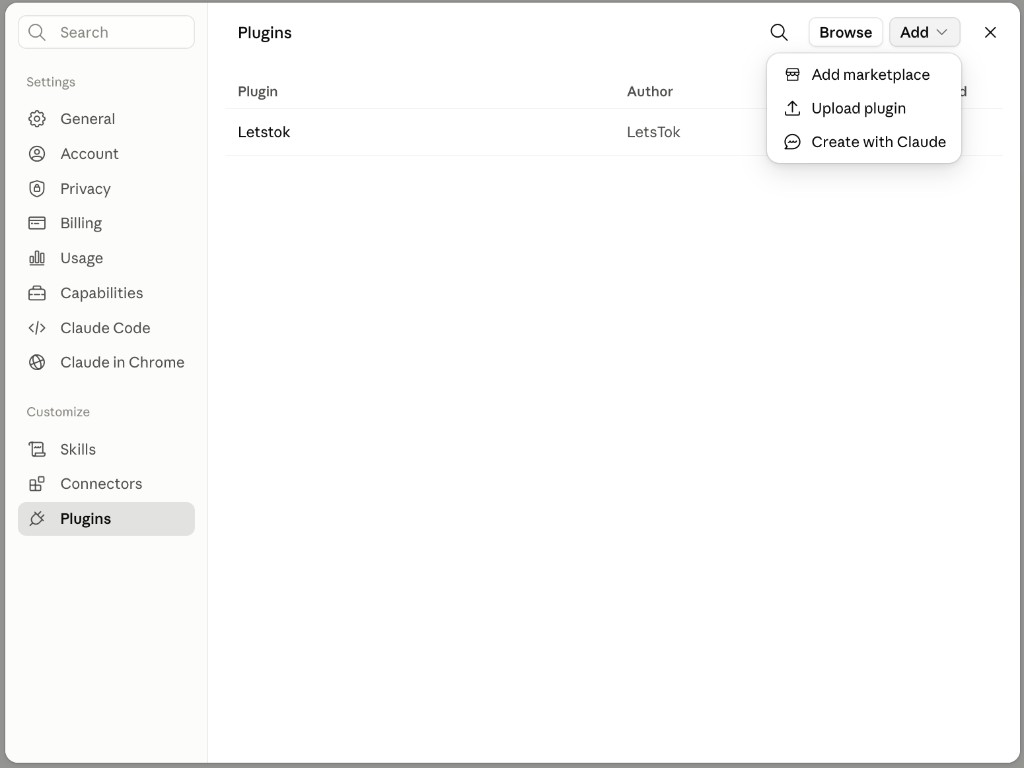
Open Settings → Plugins → Add → "Add marketplace"
In Claude, open Settings and pick "Plugins" under Customize. Click the "Add" button and choose "Add marketplace", then enter: Letstokltd/skills
- 2
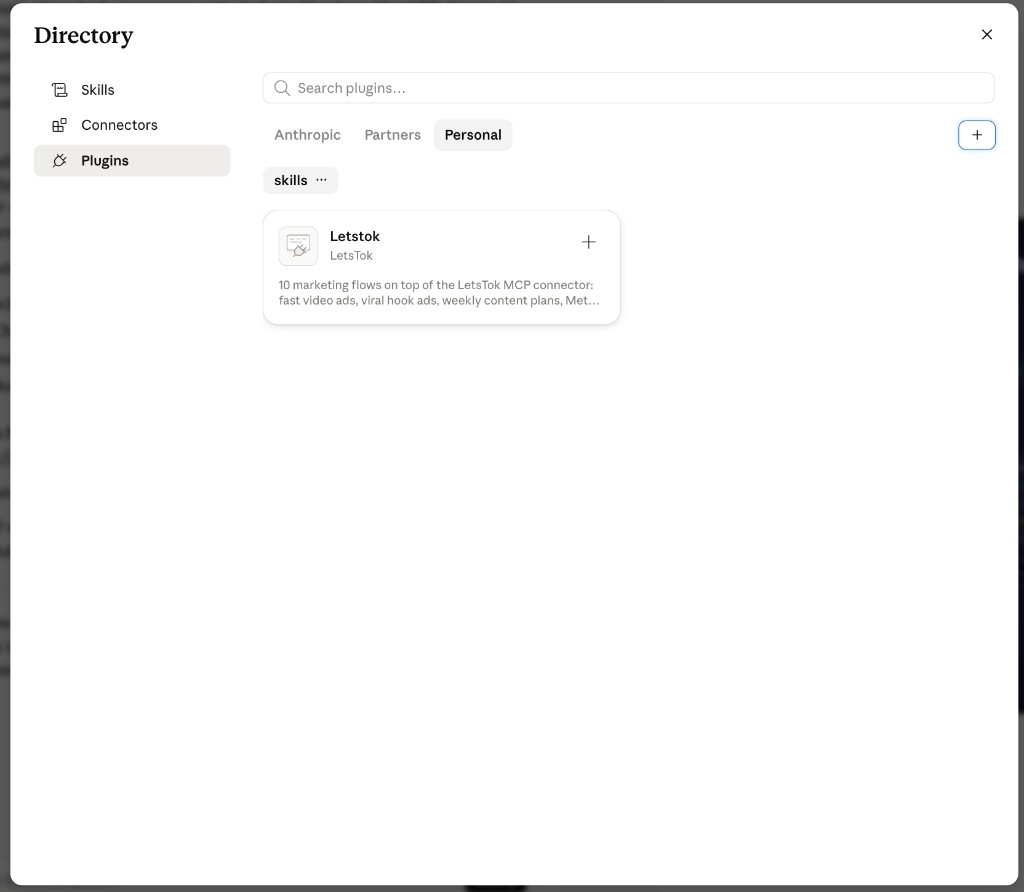
Find LetsTok in the Directory
Open the Directory → Plugins → "Personal" tab. You'll see the new "skills" marketplace with the Letstok plugin card - click it.
- 3
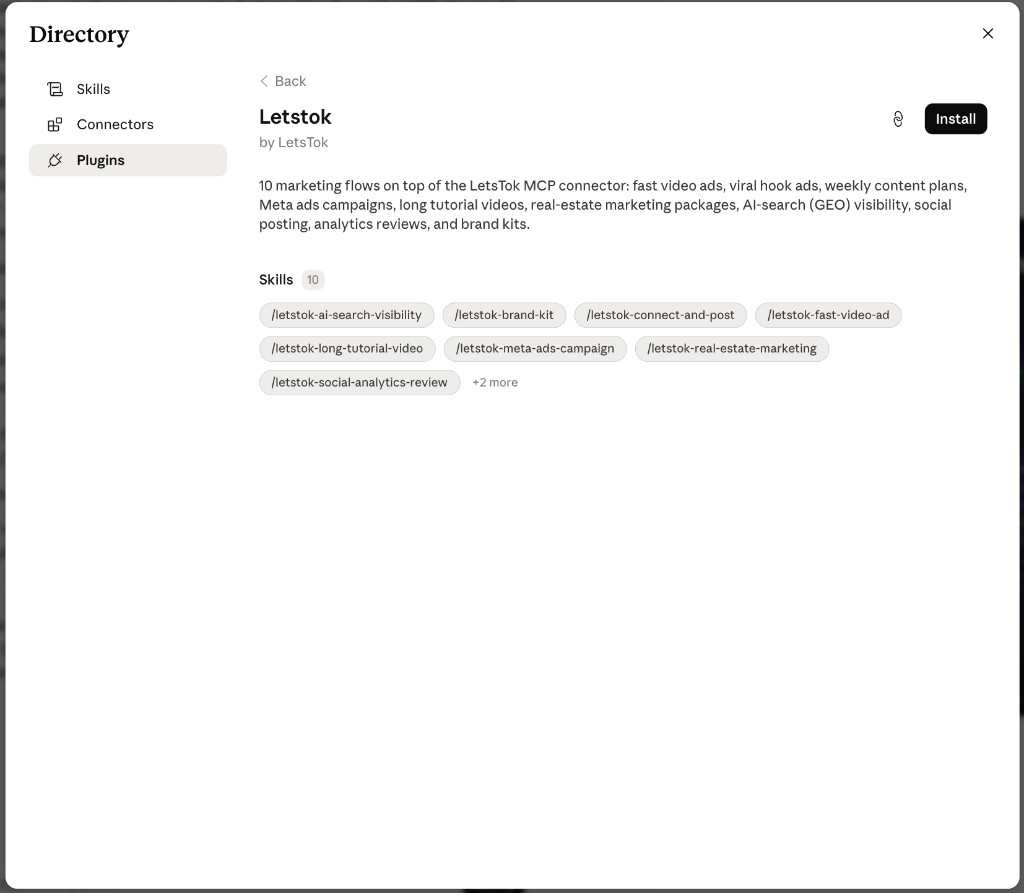
Click "Install"
The plugin page lists all 10 skills. Click "Install" - that's the whole setup.
- 4
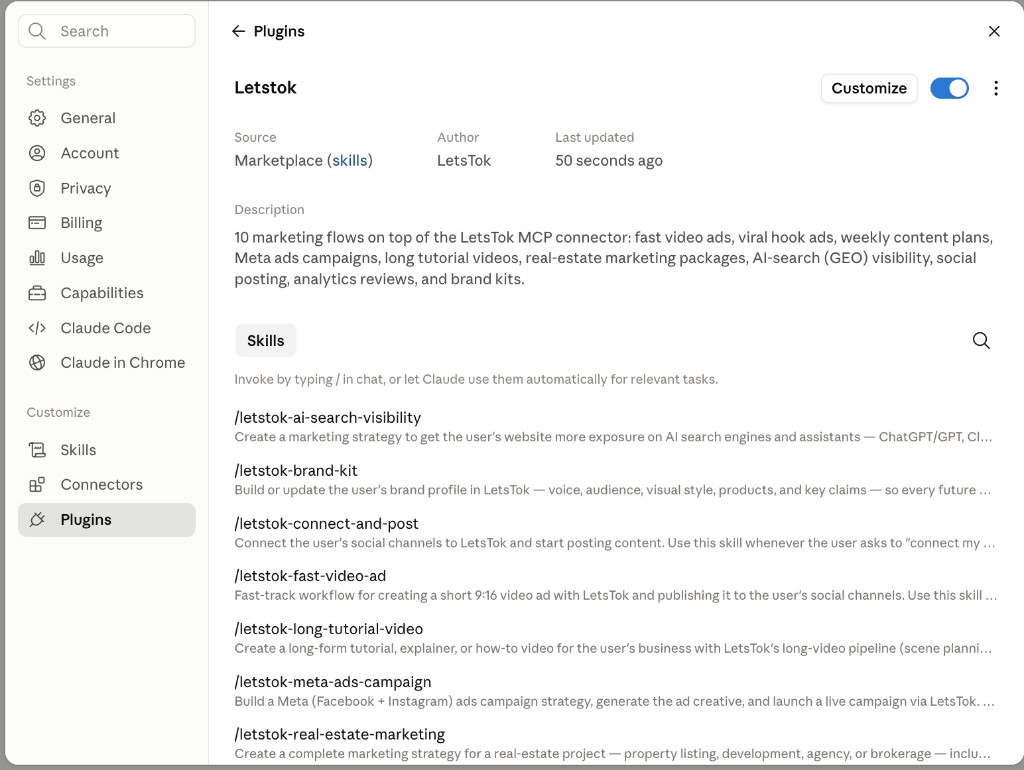
Done - the skills are live
The Letstok plugin shows as enabled with every skill ready. Type "/" in any chat (e.g. /letstok-fast-video-ad) or just ask naturally - Claude picks the right skill by itself.
Letstokltd/skillsSay this to your assistant
After installing, any of these kicks off the matching skill.
Frequently asked questions
Is the skills library free?
Yes - it's open source (MIT) on GitHub. You only pay LetsTok generation credits when a skill creates videos or campaigns, and every skill shows the estimated cost and asks for your approval first.
Which AI tools are supported?
Claude (Claude.ai, Cowork, Claude Code), Cursor, Codex and any agent that loads Markdown-based skills. ChatGPT works too - paste the skill file into the chat or a custom GPT.
Do I need the LetsTok connector?
Yes. The skills orchestrate LetsTok's MCP tools - without the connector they have nothing to run. Adding the connector is free and takes about a minute.
Can a skill spend money without asking?
No. Generation always requires your approval after seeing the estimated credit cost, and Meta campaigns additionally require an explicit final confirmation before any ad budget is spent.
A skill doesn't trigger - what do I do?
Make sure the skill is installed and enabled and the LetsTok connector is connected. If you see STARTER_PLAN_REQUIRED, upgrade your plan and simply ask again - no reinstall needed.
Give your AI assistant a marketing team
Free, open source, and set up in minutes.